Model Context Protocol (MCP) is an open-source protocol that standardizes how AI models (LLMs) connect to external tools, data sources, and services.
Instead of every AI app inventing its own way to connect to a database, SaaS tools (Slack, Notion, Jira, etc.), local files, internal APIs, or custom tools, MCP provides a common interface so models and tools can interoperate cleanly.
Without MCP, every integration becomes custom glue - hard to maintain, hard to secure, hard to scale.
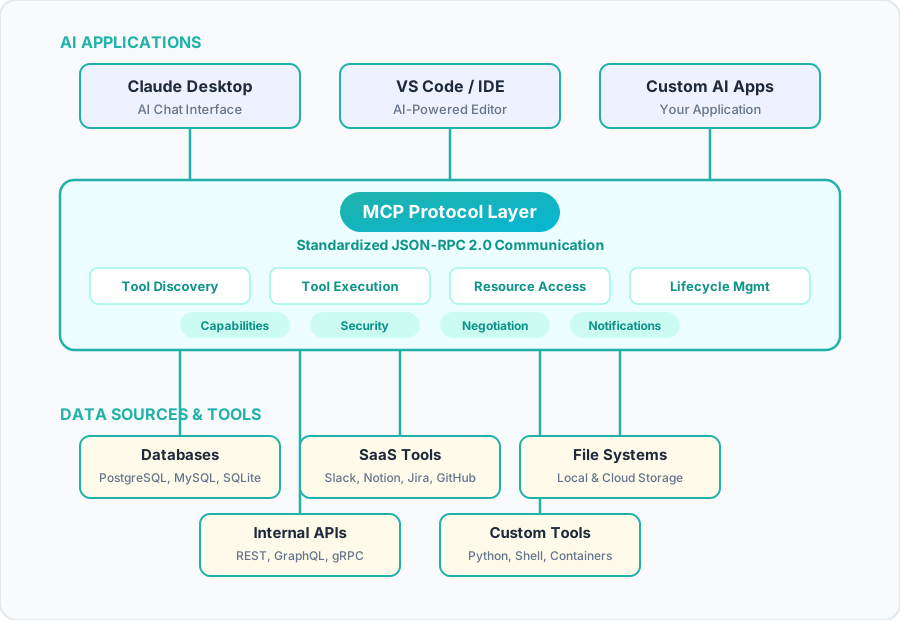
MCP uses JSON-RPC 2.0 as a protocol to communicate. It standardizes the request-response in a certain format:
- I initiate, you respond in a certain format
- Then I ask for your capabilities, you provide your tools in a certain format
- I ask for recent changes, you respond with recent changes in a certain format
MCP is not about a new protocol itself, but more about standardizing the JSON-RPC protocol by building additional layers that allow for universal AI communication.
Breaking down the name:
Model AI model like an LLM
Context Server-side context, not conversational context. LLMs have conversational context (what we’re talking about), while context for MCP is capability/domain/schema/data context (what we can do with this tool)
Protocol A higher level of standardization than what JSON-RPC provides, acting as a universal standard for interaction between AI apps
MCP vs API
MCP sits on top of APIs and standardizes how models interact with them.
While APIs are built for developers, MCP is meant to be utilized by LLMs.
Your LLM agent can interrogate an MCP server and ask what its capabilities are, and then decide which tool or resource it’s going to utilize to address the task at hand. With an API endpoint, you need to know what that capability is going in, it doesn’t tell you about itself.
Architecture
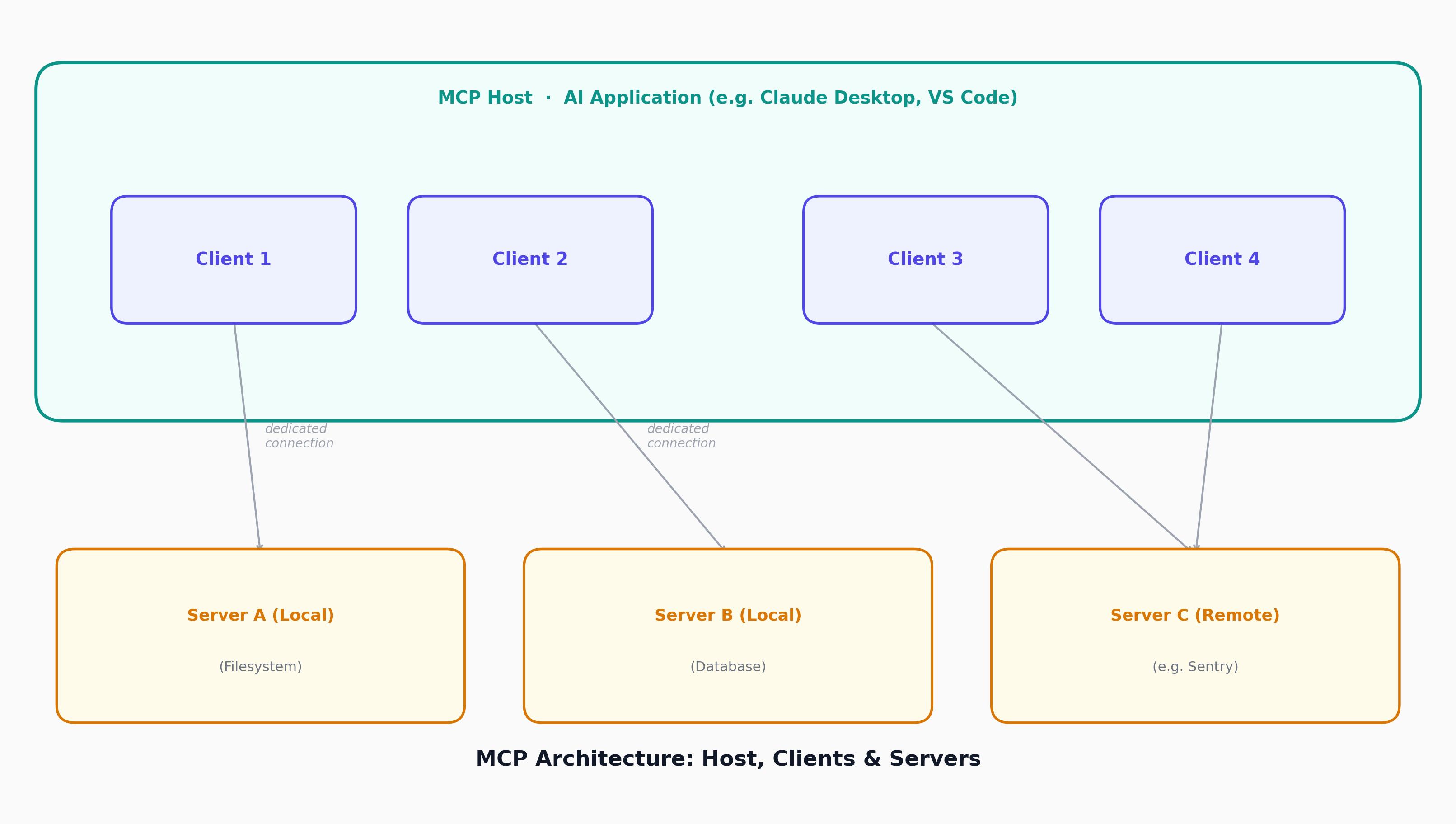
MCP follows a client-server architecture where an MCP host - an AI application like Claude Code or Claude Desktop, establishes connections to one or more MCP servers. The MCP host accomplishes this by creating one MCP client for each MCP server. Each MCP client maintains a dedicated connection with its corresponding MCP server.
The key participants in the MCP architecture are:
MCP Host The AI application that coordinates and manages one or multiple MCP clients.
MCP Client A component (App/IDE/Agent) that maintains a connection to an MCP server and obtains context from an MCP server for the MCP host to use.
MCP Server A program that provides context to MCP clients. It’s just any other service we build and operate that exposes an API using JSON-RPC, designed to be used by LLMs, not just traditional application code. MCP servers can execute locally or remotely.
Modern LLMs support tool calling (evolved from function calling), where the model is told “here are the tools you can use”. The LLM can then request “call tool X with param Y”. The host application executes the tool call, sends the results back to the LLM, which uses this as additional context to generate a response.
For example: AI-powered IDE, acting as MCP host, connects to a bug-tracking MCP server, the host creates a dedicated MCP client to manage that connection. If it later connects to a filesystem server or a documentation server, each gets its own MCP client, so one host can talk to many servers through separate client instances, each maintaining its own session.
MCP is a stateful protocol that requires lifecycle management.
Primitives
Primitives define what clients and servers can offer each other. MCP defines three core primitives that servers can expose:
Tools (Actions)
Executable functions that AI applications can invoke to perform actions e.g., file operations, API calls, database queries like search_jira, run_sql. Each tool defines: name, description, JSON input schema, optional output schema.
tools/list
Discover available tools
tools/call
Execute a specific tool
Resources Data sources that provide contextual information to AI applications e.g., file contents, database records, API responses, documentation, logs.
Prompts (prompt templates) Reusable templates that help structure interactions with language models e.g., system prompts, few-shot examples.
Each primitive type has associated methods for discovery (*/list), retrieval (*/get), and in some cases, execution (tools/call). MCP clients use the */list methods to discover available primitives. For example, a client can first list all available tools (tools/list) and then execute them. This design allows listings to be dynamic.
Instead of hard-coding tools, MCP lets a model dynamically discover what tools exist, what arguments they accept, and what they return. Each tool is described in structured JSON like metadata:
{
  "name": "search_jira",
  "description": "Search Jira issues",
  "input_schema": {
    "type": "object",
    "properties": {
      "query": {"type": "string"}
    }
  }
}
MCP also defines primitives that clients can expose. These primitives allow MCP server authors to build richer interactions:
Sampling
Allows servers to request language model completions from the client’s AI application via sampling/complete — useful when server authors want LLM access while staying model-independent.
Elicitation
Allows servers to request additional information from users via elicitation/request — useful for getting more context or asking for confirmation of an action.
Logging Enables servers to send log messages to clients for debugging and monitoring purposes.
Example
Let’s walk through a full example: “Summarize open high-priority Jira tasks”.
1. Initialization (Lifecycle Management)
Before any user query, the client connects to the MCP server through a capability negotiation handshake:
Protocol Version Negotiation Ensures both client and server are using compatible protocol versions.
Capability Discovery The capabilities object allows each party to declare what features they support, including which primitives they can handle (tools, resources, prompts).
Identity Exchange
clientInfo and serverInfo objects are exchanged.
Client → Server (initialize request):
{
  "jsonrpc": "2.0",
  "id": 1,
  "method": "initialize",
  "params": {
    "protocolVersion": "2025-11-25",
    "capabilities": {
      "elicitation": {}
    },
    "clientInfo": {
      "name": "example-client",
      "version": "1.0.0"
    }
  }
}
Server → Client (response: capabilities):
{
  "jsonrpc": "2.0",
  "id": 1,
  "result": {
    "protocolVersion": "2025-11-25",
    "capabilities": {
      "tools": {"listChanged": true},
      "resources": {}
    },
    "serverInfo": {
      "name": "example-server",
      "version": "1.0.0"
    }
  }
}
2. Tool Discovery (Primitives)
The client asks the server what tools are available by calling tools/list:
{
  "jsonrpc": "2.0",
  "id": 2,
  "method": "tools/list"
}
The MCP server advertises a tools array e.g. search_jira, get_ticket_details, summarize_text. The client then exposes this tool definition to the LLM. (The AI application fetches available tools from all connected MCP servers and combines them into a unified tool registry that the language model can access.)
{
  "jsonrpc": "2.0",
  "id": 2,
  "result": {
    "tools": [
      {
        "name": "search_jira",
        "description": "Search Jira issues",
        "input_schema": {
          "type": "object",
          "properties": {
            "query": {"type": "string"}
          },
          "required": ["query"]
        }
      },
      {
        "name": "get_ticket_details",
        "...": "..."
      }
    ]
  }
}
3. Model Reasoning & Tool Call
User query: “Summarize open high-priority Jira tasks”. The model reasons:
- I need Jira data.
- I should call
search_jira.
The LLM generates the structured output required for this call:
{
  "tool": "search_jira",
  "arguments": {
    "query": "priority=high AND status=open"
  }
}
The MCP client intercepts this and translates it into a JSON-RPC request.
4. Tool Execution (Primitives)
Client → Server (tools/call):
{
  "jsonrpc": "2.0",
  "id": 3,
  "method": "tools/call",
  "params": {
    "name": "search_jira",
    "arguments": {
      "query": "priority=high AND status=open"
    }
  }
}
Server → Client (result):
{
  "jsonrpc": "2.0",
  "id": 3,
  "results": {
    "content": [
      {
        "type": "text",
        "text": "JIRA-ISSUE-1: Deploy Qwen model\nJIRA-ISSUE-2: Optimize inference\nJIRA-ISSUE-3: Tokenize data"
      }
    ]
  }
}
The MCP client inserts the tool results into the LLM’s context. Now the model has Jira data. When the LLM decides to use a tool during a conversation, the AI application intercepts the tool call, routes it to the appropriate MCP server, executes it, and returns the results back to the LLM as part of the conversation flow. This enables the LLM to access real-time data and perform actions in the external world.
The model generates the final response:
There are 3 open high-priority tasks:
* JIRA-ISSUE-1: Deploy Qwen model
* JIRA-ISSUE-2: Optimize inference
* JIRA-ISSUE-3: Tokenize data
5. Notifications
If the server updates tool availability dynamically, it can notify the client:
{
  "jsonrpc": "2.0",
  "method": "notifications/tools/list_changed"
}
The client can then re-fetch tools:
{
  "jsonrpc": "2.0",
  "id": 2,
  "method": "tools/list"
}
In the above example, the model:
- never calls JIRA directly,
- doesn’t know about HTTP,
- doesn’t know about authentication,
- doesn’t know about implementation details.
It only sees “there is a tool called search_jira”.
MCP standardizes the entire lifecycle of:
- discovering tools
- calling tools
- returning structured results
- continuing reasoning
QUIZ: Test Your Knowledge
References
Comments